2GO Express Online Booking

Shipping with 2GO Express no longer requires a branch visit. You can book a domestic pickup, schedule a delivery, or arrange international shipping entirely through the 2GO Express online booking website or the 2GO App Philippines. 

Schedule domestic and international shipments in minutes. No branch visit required.
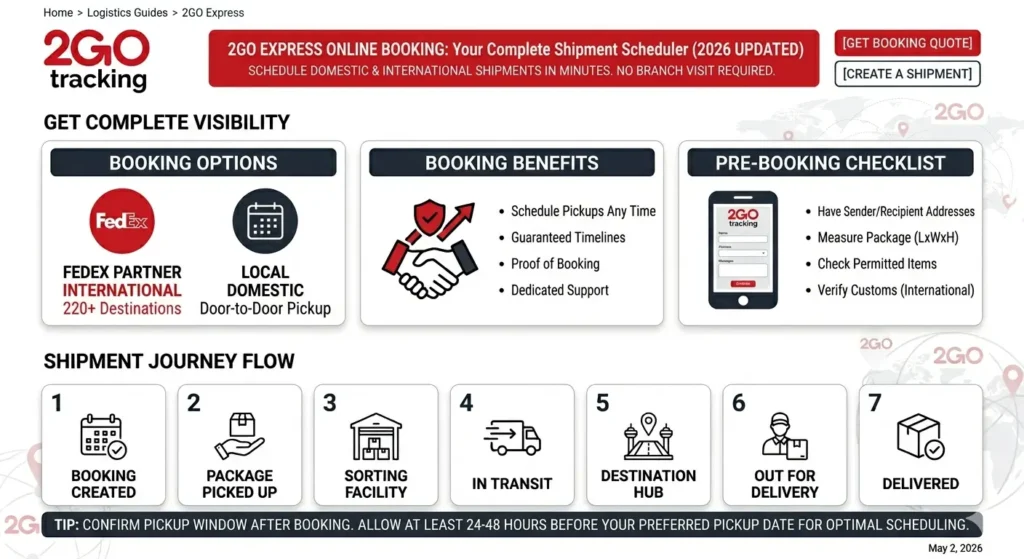
image for 2go express online booking

2GO Express Online Booking

2GO Express online booking is the digital shipment scheduling system that lets senders book courier pickups and deliveries without walking into a branch.

  • Book a domestic door-to-door parcel pickup
  • Schedule an international delivery via the FedEx partnership
  • Request a corporate account booking
  • Find the nearest branch for drop-off

The 2GO App Philippines goes further, bringing together travel tickets, express delivery bookings, and exclusive app-only discounts in one place.

Online Booking Methods Available

There are three ways to 2GO Express Online Booking shipment:

Method

Best For

Access Point

2GO Express Website

Domestic and international parcels

express.2go.com.ph

2GO App Philippines

Parcel booking, FedEx bookings, travel

Google Play / App Store

Corporate Booking Portal

Business clients with high shipment volume

express.2go.com.ph/corporate

Book a 2GO Express Pickup Online

Official Website

  • Go to official website and click “Online Booking” from the main menu.
  • Select “Online Pickup Booking” from the service options.
  • Fill out the booking form completely. Required details include:
  • Sender’s full name, address, and contact number
  • Recipient’s full name, complete delivery address, and mobile number
  • Package description, weight, and dimensions
  • Preferred pickup date and time
  • Submit the form. A booking number will be sent to you by a 2GO Customer Service Representative to confirm your pickup request.
  • Prepare your package and wait for the 2GO rider to arrive at the scheduled time.

2GO App Philippines

  • Download the 2GO App Philippines from Google Play or the App Store.
  • Create an account in three steps: Sign Up, verify your email, and complete your profile.
  • Tap “Express Delivery” from the app home screen.
  • Enter your pickup address, delivery address, and package details.
  • Choose your service type (standard, same day, or COD).
  • Confirm and pay through your preferred payment method.
  • Receive your booking confirmation and 2GO waybill number instantly in the app.

Book a FedEx International Delivery via 2GO Online

2GO Express is the sole FedEx retail partner in the Philippines, allowing you to book international shipments to over 220 destinations through the 2GO App:

  • Open the 2GO App and create or log in to your account.
  • Tap “Book FedEx Delivery” from the express services menu.
  • Enter the sender and recipient details, including the international destination address.
  • Select your FedEx service level: International Priority, Economy, or other available options.
  • Enter package weight and dimensions to get a rate quote.
  • Confirm and pay via the in-app payment options.
  • Drop off the package at the nearest 2GO Premium Express branch or request a pickup.

Payment Options

2GO Express online booking and the 2GO App support multiple online and offline payment channels:

Credit and Debit Cards:

  • Visa
  • Mastercard
  • JCB
  • American Express

E-Wallets:

  • GCash
  • Maya (PayMaya)

Online Banking:

  • BDO
  • BPI
  • UnionBank
  • PNB
  • BancNet ATM

Over-the-Counter:

  • 7-Eleven
  • Bayad Center
  • Other accredited payment partners

Book a Corporate 2GO Express Shipment Online

Businesses with regular high-volume shipping needs can access 2GO’s corporate booking portal through express.2go.com.ph. Corporate accounts get:

  • Dedicated account managers
  • Consolidated billing
  • Bulk pickup scheduling
  • Priority service lanes for high-volume shipments
  • API integration for automated booking via your own e-commerce system

To set up a corporate account, email express@2go.com.ph with your company details and estimated monthly shipment volume.

Benefits of Booking 2GO Express Shipments Online

Booking online instead of visiting a branch gives you several practical advantages:

  • Save time. No queuing at a branch. Book in minutes from your phone or computer.
  • 24/7 access. Submit a pickup request any time of day, even outside branch operating hours.
  • Instant confirmation. Receive your waybill number immediately after booking via the app.
  • Exclusive app discounts. The 2GO App offers app-exclusive promotions not available at physical counters.
  • Track in one place. Your booking history and tracking records are stored in your 2GO App account.
  • FedEx international access. Book international shipments to 220+ destinations without visiting a branch.
  • COD management. Set up and manage Cash on Delivery shipments directly from the booking form.

Things to Prepare Before Booking Online

Have these details ready before opening the booking form to complete your booking without interruption:

  • Sender’s full name, complete address, and active mobile number
  • Recipient’s full name, complete delivery address, including barangay, and mobile number
  • Package weight and approximate dimensions
  • Contents description (required for customs clearance on international shipments)
  • Declared value of the package (important for claims if the package is lost or damaged)
  • Preferred pickup date and time window
  • Payment method details

Common Online Booking Problems and Fixes

Booking form is not submitting

Clear your browser cache or switch to a different browser. The 2GO Express website works best on Google Chrome.

No booking confirmation received

Check your spam or junk folder. If no email arrives within 30 minutes, call 2GO at (+632) 877-99-222 with your reference number.

App is not loading the booking page

Update the 2GO App to the latest version from Google Play or the App Store and try again.

Pickup address not recognized

The online form may not accept incomplete addresses. Make sure the barangay, city, and province fields are fully filled out.

FAQs

Yes. The online pickup booking form at express.2go.com.ph covers domestic destinations nationwide, including provincial areas in Luzon, Visayas, and Mindanao. Pickup availability depends on your specific address and whether it falls within 2GO’s serviceable zones.

The online booking platform itself is free. You only pay the standard shipping fee based on the weight, dimensions, and destination of your package.

After booking, a 2GO Customer Service Representative contacts you to confirm the pickup schedule. Standard pickup is typically arranged for the next business day after booking confirmation.

Contact 2GO Express at expresssupport@2go.com.ph or (+632) 877-99-222 as soon as possible to cancel or modify a booking. Cancellations are easier to process before the rider is dispatched.

Both platforms let you book domestic pickups and deliveries. The 2GO App additionally supports FedEx international booking, travel ticket purchases, shipment tracking, and app-exclusive discount promotions. The website corporate portal is better suited for bulk business accounts.

Yes. COD is available as a service option in the online booking form. Enter the COD amount during booking and 2GO will collect payment from the recipient at delivery before disbursing it back to the sender.

Conclusion

You now have everything you need to book a 2GO Express shipment without leaving your home or office. Use the official platform at express.2go.com.ph for domestic and corporate bookings, or download the 2GO App Philippines for the fastest booking experience with FedEx international access and app-exclusive deals. If your package is already booked and on its way, use the tracking tool on this site to monitor its status in real time.

2GO

Developed & Maintained By

This platform is optimized by the 2GO Tracking Technical Team. Providing verified 2026 logistics data, real-time shipment monitoring, and comprehensive branch guides for users across the Philippines.
Similar Posts

Leave a Reply

Your email address will not be published. Required fields are marked *